
An .excalidraw file, Excalidraw's native diagram-sharing format, can carry arbitrary JavaScript within the customData.generationData.html field. When a victim opens the file, that code executes inside a sandboxed iframe embedded in the editor's canvas.
The Yokai Research team documents this vulnerability here with a minimal reproducible example. This is not a conventional reflected XSS vulnerability involving a URL parameter: the attack vector is a file that recipients already expect to receive, and a phishing interface can be rendered inside the canvas, benefiting from the visual trust associated with the legitimate application.
Background: Stored XSS
Cross-Site Scripting (XSS) is a code-injection vulnerability in which a browser executes attacker-controlled code in the context of a page trusted by the victim. When malicious code is stored first—in a file, database, or persistent field—and executed later when someone opens that content, the vulnerability is classified as stored XSS (also known as persistent XSS).
The fundamental conceptual model is the data flow:
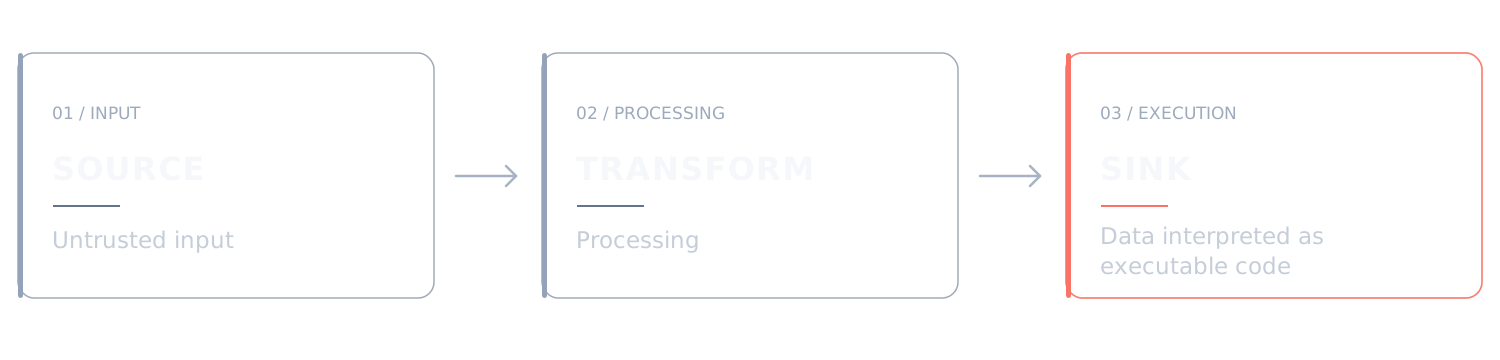
The security requirement is to break this path at any of its three stages. When a product preserves an opaque field from an imported file and subsequently passes it into an iframe's srcdoc without sanitization, all three stages remain connected:
- Source:
customDatain the.excalidrawJSON, controlled by whoever crafted the file. - Transformation: None. The string is copied byte for byte (this is where the issue arises).
- Sink: The
<iframe>element'ssrcdocattribute, which the browser interprets as a complete HTML document.
Root Cause
The vulnerability consists of three connected stages, all present in Excalidraw's source code. Let's trace the data from the file to execution.
Stage 1: restore.ts accepts raw customData
File: packages/excalidraw/data/restore.ts, lines 515–518 (restoreElementWithProperties function)
if ("customData" in element || "customData" in extra) {
  base.customData =
    "customData" in extra ? extra.customData : element.customData;
}
This is the entry point. When a user selects File → Open (or drags the file onto the canvas), each JSON element passes through restoreElements → restoreElement → restoreElementWithProperties.
Notice the contrast: other properties undergo explicit normalization, including fillStyle, strokeWidth, link (through normalizeLink), validated boundElements, version, and opacity. The customData field, by contrast, is accepted as provided, without type checking, nested-structure validation, or a key allowlist.
This is not merely an isolated oversight; it reflects an architectural decision. The comment immediately below reveals the intent:
const ret = {
  // spread the original element properties to not lose unknown ones
  // for forward-compatibility
  ...element,
  ...
} as unknown as T;
Forward compatibility provides a legitimate reason to preserve unknown fields. The problem is that customData is not simply a generic field: it is a namespace with known semantics, and one of its nested properties, generationData.html, has a specifically security-sensitive meaning.
Stage 2: App.tsx turns html into a document
File: packages/excalidraw/components/App.tsx, lines 1842–1860 (renderEmbeddables method)
if (isIframeElement(el)) {
  src = null;

  const data: MagicGenerationData = (el.customData?.generationData ??
    this.magicGenerations.get(el.id)) || {
    status: "error",
    message: "No generation data",
    code: "ERR_NO_GENERATION_DATA",
  };

  if (data.status === "done") {
    const html = data.html;
    src = {
      intrinsicSize: { w: el.width, h: el.height },
      type: "document",
      srcdoc: () => {
        return html;
      },
    } as const;
  }
}
This is the sink. Three observations deserve particular attention:
a) The source of truth is ambiguous. Line 1845 falls back between two locations: el.customData?.generationData and this.magicGenerations.get(el.id), an in-memory Map holding the output of live AI generation. Runtime data (in memory, treated as trusted) and serialized file data (untrusted) converge into the same data variable and are subsequently handled identically. The ?? operator effectively erases the distinction between their origins.
b) status is a state guard, not a trust guard. The if (data.status === "done") check distinguishes completed generation from pending or failed generation. But status comes from the same untrusted object. An attacker can place "status": "done" in the JSON and satisfy this condition.
c) return html performs no transformation. Compare this with the adjacent branches, which construct documents from literal templates defined in the application code (lines 1861–1930). The pending and error paths build HTML through createSrcDoc(...), using content encoded in the template string. The done path is the only one that returns an externally supplied value verbatim.
This contrast is a classic signature of injection: one branch treats data as input, while another treats that same data as output ready for execution.
Stage 3: A permissive sandbox completes the chain
File: packages/excalidraw/components/App.tsx, lines 2047–2069
<iframe
  ref={(ref) => this.cacheEmbeddableRef(el, ref)}
  className="excalidraw__embeddable"
  srcDoc={
    src?.type === "document"
      ? src.srcdoc(this.state.theme)
      : undefined
  }
  src={
    src?.type !== "document" ? src?.link ?? "" : undefined
  }
  scrolling="no"
  referrerPolicy="no-referrer-when-downgrade"
  title="Excalidraw Embedded Content"
  allow="accelerometer; autoplay; clipboard-write; encrypted-media; gyroscope; picture-in-picture"
  allowFullScreen={true}
  sandbox={`${
    src?.sandbox?.allowSameOrigin
      ? "allow-same-origin"
      : ""
  } allow-scripts allow-forms allow-popups allow-popups-to-escape-sandbox allow-presentation allow-downloads`}
/>
A single sandbox configuration serves the product's embeddable elements. Its flags are important because they define what attacker-controlled content can and cannot do.
| Flag | Status | What It Enables |
|---|---|---|
allow-same-origin (absent) |
No. The customData path does not define src.sandbox. |
The iframe is assigned an opaque origin, preventing direct access to the parent application's localStorage, document.cookie, and DOM. |
allow-scripts |
Yes | JavaScript execution through <script> elements and event handlers. |
allow-forms |
Yes | Form submissions, including cross-origin POST requests. Enables phishing and submission of user-entered credentials. |
allow-popups |
Yes | Opens new browsing windows through window.open(), subject to browser policies. |
allow-popups-to-escape-sandbox |
Yes | Allows new windows to open without inheriting the original iframe's sandbox restrictions. |
allow-presentation |
Yes | Allows access to the Presentation API where supported. Does not independently grant fullscreen access. |
allow-downloads |
Yes | Allows downloads initiated by the iframe, subject to browser security and user-interaction policies. |
The absence of allow-same-origin in this particular code path is significant and was validated by the team as a partial mitigation. This restriction is meaningful: the attacker cannot directly read cookies from excalidraw.com, access its localStorage, or manipulate the parent document's DOM. It therefore prevents straightforward account takeover (ATO) through direct session theft.
However, three permissions remain particularly relevant to phishing-related abuse:
allow-formspermits submission of forms, including cross-origin form submissions. Such navigations are not governed by the same CORS restrictions as JavaScript access to cross-origin responses.allow-popups-to-escape-sandboxallows permitted pop-ups to open without inheriting the original iframe's sandbox restrictions. A page opened in this way operates in its own browser context and under its own origin, with capabilities governed by browser policies and user-interaction requirements.allow-downloadspermits downloads initiated from within the iframe, subject to browser safeguards. This can contribute to download-based social-engineering scenarios but does not, by itself, imply automatic execution of downloaded files.
Exploitation
The exploitation process begins by manually modifying the structure of an .excalidraw file. This format uses JSON to store the elements of a scene, their properties, and associated metadata.
During analysis of the element import and restoration process, we identified that objects of type iframe can contain the customData.generationData property, which stores information associated with HTML content generated for the element.
The issue arises because the html property's contents are preserved during restoration and subsequently used to construct an iframe's srcdoc attribute without adequate sanitization.
To demonstrate this behavior, we manually crafted an .excalidraw file containing an iframe element and a short JavaScript snippet designed to log a message to the browser console.
The essential payload is shown below:
{
  "type": "excalidraw",
  "version": 2,
  "source": "https://excalidraw.com",
  "elements": [
    {
      "id": "iframe-poc-f01",
      "type": "iframe",
      "x": 100,
      "y": 100,
      "width": 520,
      "height": 340,
      "angle": 0,
      "strokeColor": "#000000",
      "backgroundColor": "transparent",
      "fillStyle": "hachure",
      "strokeWidth": 1,
      "strokeStyle": "solid",
      "roughness": 1,
      "opacity": 100,
      "seed": 1,
      "version": 1,
      "versionNonce": 0,
      "isDeleted": false,
      "groupIds": [],
      "frameId": null,
      "roundness": null,
      "boundElements": [],
      "updated": 1,
      "link": null,
      "locked": false,
      "customData": {
        "generationData": {
          "status": "done",
          "html": "<h2>Stored XSS - PoC</h2><script>console.log('PWNED BY HAKAI');</script>"
        }
      }
    }
  ],
  "appState": {
    "gridSize": 20,
    "viewBackgroundColor": "#ffffff"
  },
  "files": {}
}
The example above represents a scene containing a single iframe element positioned at coordinates x: 100 and y: 100, with dimensions of 520 × 340 pixels.
Although the structure includes several properties used by Excalidraw to represent graphical elements, three fields are particularly relevant to this exploit.
1. Element identification: type: "iframe"
The type property determines how an element is interpreted during scene restoration and rendering.
The value iframe directs the object through the processing path for embedded elements, allowing content stored in its metadata to be used when constructing an HTML iframe.
2. Generation state: customData.generationData.status
The status property indicates the state associated with the element's HTML content.
By manually setting the value to "done", the file presents the content as previously generated and completed, satisfying one of the conditions used by the application to select the HTML to render.
Crucially, this state can be set directly in the imported JSON without necessarily originating from a legitimate content-generation operation.
3. Attacker-controlled content: customData.generationData.html
This property is the primary entry point investigated in this research.
It stores an HTML string that can be assigned to the iframe's srcdoc property during rendering.
In this example, the content includes a visual element and a short script:
<h2>Stored XSS - PoC</h2>

<script>
  console.log(
    "PWNED BY HAKAI"
  );
</script>
Execution of this script provides direct evidence that the browser interpreted the researcher-controlled content as active code rather than treating it solely as data from the imported file.
It is important to note that the structure shown here was crafted specifically for the analyzed code path. Restoration behavior may vary between Excalidraw versions, particularly where element validation and normalization differ.
Importing and executing the malicious file
With the payload prepared, the next step is to import it into the application and observe the restoration mechanism's behavior.
Validation was performed against a local Excalidraw instance.
The manual procedure consists of four steps:
- Save the JSON shown above as
poc-xss.excalidraw. - Open the Excalidraw instance and use the file-open/import feature to load the scene.
- Verify that the
iframeelement is restored and displayed on the canvas with the HTML content defined in the payload. - Open the browser's Developer Tools (DevTools) and inspect the console for the message produced by the embedded JavaScript.
On a vulnerable instance that follows the identified execution path, the expected result is:
PWNED BY HAKAIThis evidence confirms that the HTML content in the imported file was interpreted by the browser and that its embedded JavaScript executed within the iframe's context.
However, script execution does not mean that the code has unrestricted access to the main application. Because the iframe is rendered with sandbox restrictions, execution takes place in an isolated context whose permissions depend on the attributes configured by Excalidraw.
Nevertheless, the result demonstrates a violation of the trust boundary between data supplied by an imported file and active content executed by the browser.
Note on the PoC video: The video demonstration used an HTTP listener to automate certain validation steps and facilitate observation of requests generated by the embedded content. This automation is not required to reproduce the vulnerability: JavaScript execution can be confirmed entirely through the manual procedure described here.
Technical analysis of the exploitation flow
The exploit is directly related to how Excalidraw restores metadata from imported elements and subsequently uses that information to render its interface.
Source-code analysis identified a sequence of operations through which file-controlled content reaches a property that the browser interprets as executable HTML.
Step 1 — Metadata restoration. During scene import, the restoration mechanism in packages/excalidraw/data/restore.ts processes the elements defined in the JSON. The customData property is preserved, keeping the contents of generationData associated with the restored element. Consequently, arbitrary content placed in html remains available to later application stages.
Step 2 — Iframe element identification. During rendering, the application identifies objects classified as iframe using logic implemented in packages/excalidraw/components/App.tsx. This matters because ordinary graphical elements do not necessarily follow the same HTML-rendering path.
Step 3 — Generation-state evaluation. The component reads customData.generationData, including its status field. When the state is "done", the associated HTML may be selected for rendering. A value set by the file's author can therefore influence an application decision without establishing that the imported data is trustworthy.
Step 4 — Assignment to the srcdoc attribute. After these checks, the contents of html are used to construct the iframe through the srcDoc property. This is the vulnerability's critical point: an externally controlled string ceases to be treated merely as stored scene information and is interpreted by the browser as an HTML document.
Step 5 — Browser interpretation. Upon receiving content through srcdoc, the browser parses the HTML document. If active elements such as scripts are present, and the sandbox configuration permits execution, the embedded JavaScript runs. In the analyzed scenario, the allow-scripts permission enables this behavior.
The defining feature of this flow is the use of data originating from an external document to determine the active content of an iframe, without maintaining a sufficiently strong separation between persisted information and executable code.
Sandbox restrictions and their impact on exploitation
Although the proof of concept demonstrates arbitrary JavaScript execution, it is essential to understand the restrictions imposed by iframe sandboxing.
In the analyzed configuration, the iframe includes the following permissions:
| Permission | Relevant behavior |
|---|---|
allow-scripts | Permits JavaScript execution inside the iframe. |
allow-forms | Permits HTML form submission. |
allow-popups | Permits opening new windows, subject to browser user-interaction policies. |
allow-popups-to-escape-sandbox | Allows newly opened windows not to inherit the original iframe's sandbox restrictions. |
allow-downloads | Allows downloads initiated by the iframe, subject to browser policies. |
allow-presentation | Enables certain Presentation API capabilities, where supported. |
The absence of allow-same-origin causes the embedded document to be assigned an opaque origin.
This prevents JavaScript running inside the iframe from directly accessing resources protected by the same-origin policy, including the main application's cookies, local storage, and parent DOM elements.
However, this protection does not eliminate every risk associated with arbitrary content execution.
The embedded document may still display third-party-controlled interfaces, run scripts within its isolated context, and initiate certain external interactions depending on browser policies and the permissions granted.
Accordingly, the vulnerability must not be treated as equivalent to JavaScript executing directly in Excalidraw's primary origin. It involves active content execution in a sandboxed iframe, introduced through data persisted in an application file.
This distinction is essential to an accurate assessment of severity and impact.
Impact scenarios
Based on the identified permissions and observed behavior, several potential impact scenarios were considered.
The table below describes technical possibilities, not necessarily outcomes fully reproduced during the PoC.
| Scenario | Potential impact | Condition or limitation |
|---|---|---|
| Rendering deceptive content | Display of fraudulent interfaces within the scene | Depends on user interaction and trust |
| Phishing through embedded forms | Collection of information voluntarily entered by users | Requires the user to complete and submit the form |
| Browser fingerprinting | Collection of information accessible within the iframe's context | Limited by browser APIs and privacy policies |
| Opening external windows | Redirection to third-party-controlled pages | Subject to pop-up and user-interaction policies |
| Content-initiated downloads | Inducing users to download external files | Does not imply automatic execution on the host |
| Propagation through shared scenes | Exposure of other users to embedded content | Depends on synchronization and element rendering |
| Cross-origin requests | Attempts to interact with external services | CORS, SameSite, network, and browser restrictions still apply |
Among these scenarios, the ability to display fraudulent interfaces inside the canvas deserves particular attention.
Because the content is rendered within an element belonging to an Excalidraw scene, a user may mistakenly interpret an embedded interface as a legitimate part of the application.
This creates opportunities for social-engineering attacks, especially when the document arrives through channels generally perceived as trustworthy, such as internal teams or collaborative workspaces.
Collaborative rooms are another important consideration. If the state of a scene containing the malicious element is synchronized and rendered for other participants, the content could reach users who never imported the original file themselves.
However, the extent of such propagation must be validated through dedicated tests that account for the Excalidraw version, synchronization behavior, and policies governing element rendering.
The use of end-to-end encryption in collaboration should not be interpreted as a guarantee that the content is invisible to all security controls. While it restricts server-side inspection, it does not necessarily prevent protections implemented on clients or at data-ingestion points.
Remediation
The proposed minimal fix targets the earliest stage of the chain, restore.ts. The underlying logic is straightforward: generationData represents the result of in-app AI generation, not trusted user input. When supplied through an import, it must not automatically be treated as an authentic generation result.
Before — packages/excalidraw/data/restore.ts, lines 515–518:
if ("customData" in element || "customData" in extra) {
  base.customData =
    "customData" in extra ? extra.customData : element.customData;
}
After — proposed patch:
-  if ("customData" in element || "customData" in extra) {
-    base.customData =
-      "customData" in extra ? extra.customData : element.customData;
+  if (element.type === "iframe" || element.type === "embeddable") {
+    // `generationData` is the in-app AI generation result, never user input.
+    // It must never survive an import round-trip.
+    const { generationData: _drop, ...rest } =
+      ("customData" in extra ? extra.customData : element.customData) ?? {};
+    base.customData = Object.keys(rest).length ? rest : undefined;
+  } else if ("customData" in element || "customData" in extra) {
+    base.customData =
+      "customData" in extra ? extra.customData : element.customData;
   }
This approach preserves the forward compatibility that motivated the original object spread while removing the identified path for dangerous imported generation data. Note that the condition also includes embeddable: an embeddable element carrying forged generationData could otherwise reach related processing in renderEmbeddables.
Attack Scenarios
High-conversion credential phishing. An .excalidraw file arrives via Slack with a message such as, “I created this diagram from our meeting notes.” The recipient opens it in Excalidraw, sees the familiar interface, and enters credentials into a panel that appears to belong to the document.
Hidden persistence in a collaborative room. An attacker inserts an iframe into a shared scene. If the malicious content is retained and synchronized, other participants may encounter it. End-to-end encryption limits server-side visibility into the scene data, although it does not eliminate client-side detection opportunities.
Silent local-service reconnaissance (variant 5). An iframe attempts to probe 127.0.0.1 on ports commonly associated with development dashboards, without visible artifacts or pop-ups. Whether such probing produces usable information depends on browser networking restrictions and the target environment.
Drive-by download with social engineering as the final step. The allow-downloads permission can facilitate a file download, while a deceptive pretext attempts to persuade the user to execute it. Download permission alone does not establish automatic code execution on the host.
Conclusion
The central lesson of this vulnerability is not simply that “Excalidraw has XSS.” It is that forward compatibility and trust boundaries can impose conflicting requirements, and the trade-off between them often goes undocumented.
The comment // spread the original element properties to not lose unknown ones for forward-compatibility reflects a reasonable product decision when considered in isolation. Preserving unknown fields allows files created by a newer application version to open in an older one—a genuinely worthwhile goal. But when that same mechanism is applied to a field with code-execution semantics, “tolerance for future versions” can become “arbitrary JavaScript execution.” Nothing at the decision point made this consequence apparent.
Three broadly applicable principles emerge:
1. A namespace is not automatically passive data. A generic container (customData, metadata, extra, attrs) with an internal key that has specific code-related semantics must be treated as an injection surface, not merely passive data. Apply allowlists appropriate to the element-type discriminator.
2. State guards are not trust guards. if (data.status === "done") checks whether an operation has completed—not where the data came from. State validation and provenance validation answer different questions, and conflating them is a recurring security footgun.
3. Sandboxing does not replace validation. Here, the sandbox enforced a meaningful boundary: the attacker could not directly read the application's cookies or access the parent origin. Yet permissions such as allow-forms, allow-popups-to-escape-sandbox, and allow-downloads still leave room for abuse and social engineering. Isolating execution is not the same as deciding what content should be allowed to execute. The question “What does this sandbox permit?” never replaces “Should this content have reached the sandbox in the first place?”
The same principle applies to document macros, report templates, custom-property fields, and any serialized format loaded by an editor from a user-supplied file. The rule remains the same: the author of the file can influence what the editor executes unless the editor explicitly enforces a boundary.
There is also a fourth lesson, organizational rather than technical: a CVE without a vendor fix represents a remediation-process problem as well as a software vulnerability. Private disclosure channels exist to give maintainers time to address security issues. When maintainers do not respond, organizations deploying or embedding the affected software may be left managing an unresolved vulnerability, potentially with a public exploit and no clear remediation timeline. Operators need to account for that exposure and prepare mitigations before they are urgently needed.
Let's Practice
Hacking Club is a training platform focused on the development of cybersecurity professionals. The "Exdraw" challenge simulates a server with the vulnerability mentioned in this post and can be used to reinforce the knowledge presented.
References
Primary vulnerability CVE-2026-97224 / VDB-409318
- CVE-2026-97224: Official record; CNA: VulDB; reporting credit:
kaardeco; published September 24, 2026. CVE Record · NVD entry
Product source code
- Repository: https://github.com/excalidraw/excalidraw
packages/excalidraw/data/restore.ts, lines 515–518 — verbatim preservation ofcustomDatapackages/excalidraw/components/App.tsx, lines 1842–1860 —srcdocconstructionpackages/excalidraw/components/App.tsx, lines 2064–2068 — sandbox flags
Related vulnerabilities (same class, previously fixed)
- GHSA-m64q-4jqh-f72f / CVE-2024-32472: Stored XSS in the
embeddablecomponent involvingsrcdocandallow-same-origin. Affected>=0.16.0 <0.16.4and>=0.17.0 <0.17.6; fixed in versions0.16.4and0.17.6. GitHub advisory · NVD entry - CVE-2023-26140: XSS involving canvas links.
- GHSA-39h7-pwv7-rc3x / CVE-2025-54881: XSS in Mermaid rendering (KaTeX), fixed in
@excalidraw/[email protected].